
✈️ How to Use Airport Hangout
Did you ever wish you knew where your initial classmates were or whether you were overlapping with friends at an airport? Whether it’s grabbing coffee with someone on a long sit, meeting up on a layover, or just knowing who’s around — this is the website for that. AirportHangout.com makes it easy to upload your schedule, see when your crew friends are in the same place, and actually make plans instead of just texting, “Are you in the in DEN today?”
🧭 Getting Started
-
- Create an Account
Sign up using your airline email or preferred address. Add your name, base, and a profile photo (optional but encouraged!).
- Create an Account
-
- Export Your Schedule from SkedPlus+
Log in to SkyWest Online (SWOL) and go to the SkedPlus+ tab. Click on the “Export” dropdown menu and select “Text File Detail (.txt)”. This will download a .txt version of your monthly schedule.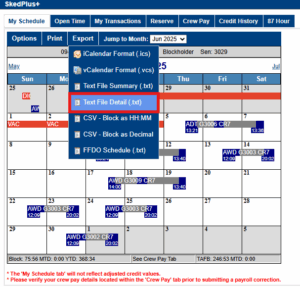
- Export Your Schedule from SkedPlus+
-
- Upload Your Schedule
Click “My Schedule” in the top menu and use the uploader to add your .txt file. Your trips, flights, and layovers will automatically appear in your personal calendar.
- Add Your Friends
Go to the Members Directory and invite your crew friends to connect. Only people you’ve added as friends will be able to see your schedule and show up in your layover matches. If you want to connect, you have to make the first move!
- Upload Your Schedule
🗓️ Viewing Your Calendar
Your uploaded trips will appear in your personal calendar. Click on any trip to view the full details, including flight numbers, layovers, hotel information, and how much downtime you’ll have. If any of your friends are on the same layover, you’ll see a “CrewMatch” badge appear.
🧑✈️ Finding Crew at Your Airport
Use the “Layover Lookup” feature or search by airport code to see who’s in the same place at the same time. You can filter by date, airport, airline, and time window to find nearby crew members to connect with.
🤝 Making Plans
To send a hangout invite, visit another user’s profile and click “Invite to Hangout”. Pick a time and suggest a meetup spot — we recommend one of our coffee shop picks! Invitations will appear in both users’ dashboards. When accepted, the plan is automatically added to both calendars.
☕ Airport Coffee Guides
Need a good cup of coffee between flights? Check out our curated list of the best airport coffee shops — written by crew, for crew. Visit the “Coffee Spots” tab in the top menu or search by airport code.
🔐 Your Privacy
Only verified airline crew can create accounts on Airport Hangout. Your personal contact info is never shared, and you control who can view your uploaded schedule. Privacy settings are customizable at any time.
🛠️ Need Help?
Visit the Help Center or email [email protected] if you need help uploading your schedule, run into any bugs, or have feedback on how we can improve the experience.